Appsemble platform
Appsemble is een low-code platform waarmee je met gemak een app kan bouwen zonder veel technische kennis. Traditionele softwareprogramma's kunnen erg complex worden en hebben uitgebreide IT-ervaring nodig om goed te maken. Appsemble verlaagt de toegangsbarrière door het ingewikkelde back-end infrastructuur voor je te regelen, waardoor jij enkel op de gebruikerservaring hoeft te focussen.
Een app wordt gemaakt door middel van een op YAML gebaseerde App-definitie. Dit vertelt Appsemble hoe je app gestructureerd is, wat voor data je op moet slaan, en nog meer.
Wanneer de app gepubliceerd is, wordt deze beschikbaar als een publieke Progressive Web App.
Appsemble bouwblokken
De lijst met momenteel beschikbare blokken die in uw apps kunnen worden gebruikt, vindt u hier. Elk blok in deze lijst is voorzien van een korte beschrijving en meer informatie over hoe ze in een app kunnen worden gebruikt. De blokken met @appsemble als organisatie zijn officiële blokken die worden beheerd door het Appsemble-team. Van andere blokken is niet gegarandeerd dat ze behouden blijven.
Voor meer informatie over het ontwikkelen van uw eigen blokken kunt u de documentatie voor blokontwikkeling raadplegen.
action-button
@appsemble
A simple button that performs an action when clicked.
audio
@appsemble
A block that renders audio and emits it using url or events API.
barcode-scan
@appsemble
A block that scans barcode
button-list
@appsemble
A block that renders list of actionable buttons
cards
@appsemble
Render data as multiple cards.
chart
@appsemble
Render a chart
control-buttons
@appsemble
This block renders a back and a forward button
data-loader
@appsemble
A block that fetches data and emits it using the events API.
data-notifier
@appsemble
A block that notifies the user if new data is available.
detail-viewer
@appsemble
A block that can be used to display various fields based on input data.
feed
@appsemble
A block that displays a feed of cards.
filter
@appsemble
A block that allows users to filter data.
footer
@appsemble
Render data as multiple cards.
form
@appsemble
A block used for inputting and submitting sets of data.
html
@appsemble
A block that can render HTML with basic templating.

image
@appsemble
A block that can be used to display an image.
list
@appsemble
A block that can be used to display a vertically oriented list of data.
map
@appsemble
A block that displays a map powered by OpenStreetMap that can be used to display and interact with markers.
markdown
@appsemble
A simple block that can display content based on Markdown input.
openai
@appsemble
A block for interacting with OpenAI
paginator
@appsemble
A block that can be used for pagination
pdf-viewer
@appsemble
A block to view PDFs in your browser, is triggered by events data.
qr-scan
@appsemble
A block that creates a video from the camera and scans for QR codes.
stateful
@appsemble
A block that can be used to store and manage state
stats
@appsemble
A block that renders some simple statistics in a friendly manner.
table
@appsemble
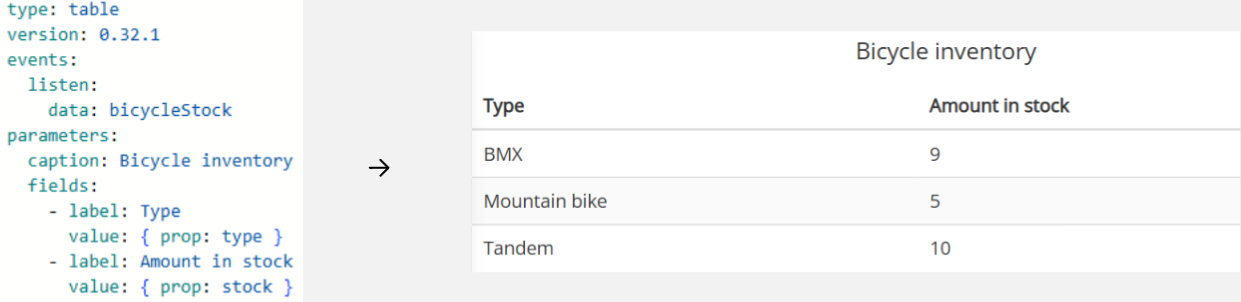
A block that can be used to display larger sets of data.
tiles
@appsemble
Render data in the form of colorful tiles.
timer
@appsemble
A block that emits an event on an interval
video
@appsemble
A block that embeds a Vimeo video.
wordcloud
@appsemble
A block that displays data in a wordcloud
camera
@10-second-move
dance-list
@10-second-move
explanation
@10-second-move
join-dance
@10-second-move
review-video
@10-second-move
select-music
@10-second-move
start
@10-second-move
view-dance
@10-second-move
reservations-calc
@amersfoort
Handle specific events for the workspace app
action
@amsterdam
bread-calc
@amsterdam
navigation
@amsterdam
process-container-status
@amsterdam
splash
@amsterdam
subscription-loader
@amsterdam
framework-selection
@digital-independence
This block fetches the list of available branches and frameworks for the Digital Independance risks app.
test-results
@digital-independence
This emits test results, so a graph block can render them.
tests
@digital-independence
This block keeps track of the test state for the Risks app.
accordion
@drive-mkb
A block that can be used to display various fields based on input data.
calendar
@drive-mkb
Visualize absences on an interactive calendar
offline-data-loader
@dsotm
reservations-calc
@eindhoven
Handle specific events for the workspace app
results-loader
@eindhoven
weseedo
@eindhoven
Block that shows a WeSeeDo meeting.
current-mood
@sounding-bodies
This block allows the user to select how they currently feel.
mood-picker
@sounding-bodies
This block picks a video for the Sound & Happy app.
mood-result
@sounding-bodies
This block picks a video for the Sound & Happy app.
trivia
@sounding-bodies
This block is used to display trivia data in the Sound & Happy app.
video-history
@sounding-bodies
This block is used to display the playback history in the Sound & Happy app.
video-picker
@sounding-bodies
This block picks a video for the Sound & Happy app.